I still remember the first image generation on my old RTX 2060: I queued it up, grabbed coffee, came back 8 minutes later to... a blurry mess with six fingers and random text saying "SPORTZ." The RTX 4080 upgrade was pure self-indulgence-until it became essential. What took 8 minutes now took 45 seconds. Suddenly, iteration became possible.
But speed alone didn't solve the fundamental problem: I needed control. Fooocus was great for quick exploration, but it kept injecting garbled text into images, had limited LoRA orchestration, and lacked the deterministic workflows I needed for production. ComfyUI solved those problems-at the cost of two days debugging Windows firewall rules, learning graph-based workflows, and wrangling VRAM budgets. This is the story of that migration, the creation of Picaso (the image prompt persona), and how vision LLMs made automated quality validation possible.
The Hardware Upgrade: RTX 2060 → 4080
A couple of years ago, I started experimenting with local image generation on an RTX 2060. It was painfully slow-8 minutes per image, and the results were mediocre at best. Generation felt like gambling: queue it up, walk away, come back to see if you won or lost.
When I committed to Mneme as a production platform, I upgraded to an RTX 4080 with 16GB VRAM. The difference was transformative:
- 8 minutes → 45 seconds for typical image generation
- Could finally iterate: generate, evaluate, adjust, regenerate
- Batch generation became practical (20 images in 15 minutes vs. 2.5 hours)
- VRAM headroom allowed stacking multiple LoRAs without crashes
That upgrade didn't just make things faster-it made experimentation viable. With the RTX 2060, every generation felt high-stakes. With the 4080, I could try five variations, pick the best, and move on. Speed unlocked creativity.
Fooocus: Fast Starts, Growing Pains
I started with Fooocus, which is underrated for shipping fast. It's a wrapper around Stable Diffusion with sensible defaults, a clean UI, and minimal configuration. For early comics, tutorials, and e-book covers, it worked-mostly.
What Fooocus Did Well
- Zero-config setup: install, run, generate
- Good default samplers and CFG settings
- LoRA support (though limited orchestration)
- Simple retry loops for batch generation
Where Fooocus Failed Me
The breaking point came when I was generating e-book covers. I'd spent 3 hours generating 20 covers for different books, and 15 of them were unusable. The problem? Fooocus insisted on adding text to images-misspelled, garbled, random text that ruined otherwise good compositions.
The moment I knew I needed ComfyUI wasn't technical-it was emotional. I'd carefully crafted prompts, tuned negative prompts to say "no text, no watermarks, no letters," and Fooocus still generated covers with "WSTMACAM CEE" and other nonsense plastered across them. I needed control, not just speed.
The Proof: Before and After
Here's visual evidence of the problem-and the solution. These are actual e-book covers generated by Mneme, showing the dramatic improvement from the Fooocus era to the Picaso + ComfyUI era:
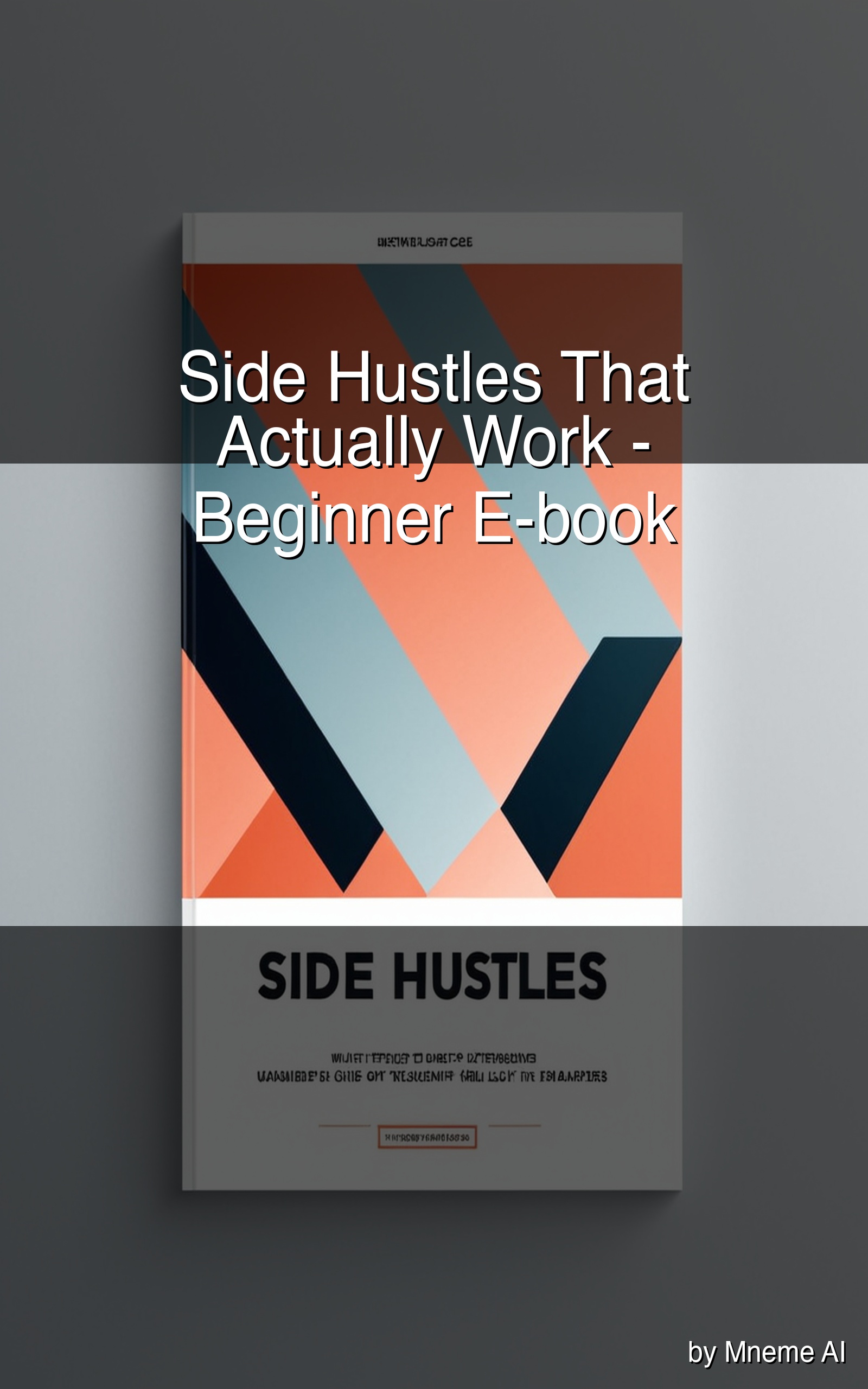
Notice the garbled text at top ("WSTMACAM CEE") and bottom (completely unreadable subtitle). This was typical of Fooocus's text injection problem-no matter how hard you fought it in the prompts.

Clean typography, professional network visualization, zero garbled text. This is what Picaso + ComfyUI enabled: precise control over composition, style, and-crucially-the absence of unwanted text.
That visual difference represents hundreds of hours of work: building Picaso, migrating to ComfyUI, tuning workflows, and implementing validation. But it was worth it-every e-book cover since has been publication-ready on first or second generation.
ComfyUI: Power, Control, and Complexity
ComfyUI is a node-based interface for Stable Diffusion that gives you full control over every stage of generation: model loading, LoRA injection, sampler configuration, upscaling, post-processing. It's powerful-and intimidating.
What ComfyUI Gave Me
- Deterministic workflows: Save graphs as JSON, version them, reproduce results exactly
- Dynamic LoRA injection: Load/unload LoRAs per request, control weights per node
- Multi-stage generation: Draft → validate → selective upscale → post-process
- Text control: Aggressive negative prompts + workflow design = no more garbled text
- Batch processing: Queue management, progress tracking, automated retries
The Price: Two Days of Ops Hell
Getting ComfyUI production-ready was not trivial:
- Windows firewall: Rookie mistake that took hours to debug. The Mac couldn't reach ComfyUI on the PC because I'd forgotten to add explicit inbound rules for port 8188. Verified with curl, disabled/enabled rules, finally got it working.
- Network routing: Pinned hostnames in Mneme config to avoid IP drift
- Trust environment variables: Set `trust_env=False` on Python HTTP clients to avoid phantom proxy settings interfering with requests
- Health checks: Mneme pings `/queue/list` on startup and backs off with jitter if ComfyUI is unreachable
• Host: Windows PC, RTX 4080 16GB (repurposed from LLM inference)
• Issues: Firewall rules, local network routing, trust_env configuration
• Tools: curl/PowerShell to probe connectivity, structured retries, WebSocket metrics
• Lesson: Treat the image box like a service, not a laptop
Picaso: The Image Prompt Persona
Once ComfyUI was stable, I needed better prompts. Generic prompts produce generic images. I needed a dedicated persona that understood compositional structure, style controls, negative cues, and how to translate content goals into precise image generation instructions.
Why a Dedicated Persona?
Initially, I used one of the general-purpose personas (the E-book Writer or Tutorial Creator) to generate image prompts. The results were mediocre-vague descriptions, missing style anchors, no attention to composition. I realized: personas tuned to specific tasks perform better.
Generalizing training across multiple activities gave worse results. When I trained a persona on both e-book content and image prompts, it became okay at both but great at neither. Specialization wins-so I created Picaso.
The Pondering Technique: Balanced Training Feedback
One challenge with persona training is overfitting. If you only train on successful outputs, the persona learns to mimic those exact patterns and loses flexibility. If you only train on failures, it learns what not to do but doesn't develop a strong positive signal.
I developed a technique I call pondering: personas do "practice work" on sections of e-book projects and receive feedback before committing to final output. This generates more balanced training data-a mix of "close but needs adjustment" and "nailed it" examples. The feedback is subtle, but it definitely improves results over time.
For Picaso specifically, pondering meant: generate image prompts for hypothetical e-book covers, evaluate them against composition rules (single focal subject, white background, no text artifacts), collect feedback, refine, repeat. Over multiple training cycles, Picaso learned what makes a good image prompt-not just what makes a grammatically correct sentence.
Personas as Abstraction: Specialization + Full Intelligence
Here's the key insight: personas are an abstraction layer. I don't use the LoRA-trained persona model directly for image generation. Instead, I use the LoRA-trained persona to generate tailored prompts for the larger, more capable LLMs (Gemma 27B, or even cloud models when justified).
This gives me the best of both worlds:
- Specialization: Picaso knows how to structure image prompts (subject anchors, style controls, negative cues)
- Full Intelligence: The final prompt is executed by a frontier model with deep reasoning capabilities
- Flexibility: Swap the underlying LLM without retraining Picaso
User Request: "E-book cover for Leadership Skills Training"
  → Picaso (LoRA-trained): Generate structured image prompt
    → Output: "Professional business portrait, network visualization overlay,
               clean typography, 3:4 aspect, editorial style, no text artifacts"
  → ComfyUI: Execute prompt with selected LoRAs + workflow
  → Vision LLM (llava:34b): Validate output
  → Result: Clean cover image
Before Picaso, I was using other personas and getting vague prompts like "a nice cover about leadership." After Picaso, prompts became precise: compositional anchors, style controls, aspect ratios, negative cues. The difference in output quality was immediate.
Dynamic LoRA Loading
Mneme selects LoRAs at runtime based on the creator module and scene intent (e.g., "clean instructional line-art" vs. "comic panel, chibi style"). LoRAs are treated as first-class parameters with weights and priority ordering.
// Example request payload to ComfyUI
{
  "workflow_id": "ebook_cover_v2",
  "inputs": {
    "prompt": "Professional network visualization, single business figure, modern editorial, 3:4, clean background",
    "negative": "text artifacts, watermark, busy background, photorealism, extra limbs",
    "seed": 12345678,
    "loras": [
      {"path": "lora/editorial_clean.safetensors", "weight": 0.8},
      {"path": "lora/network_viz.safetensors", "weight": 0.5}
    ],
    "cfg": 5.0,
    "steps": 30,
    "hires_upscale": 1.5
  }
}
I keep a LoRA registry in MongoDB with tags, last-updated timestamp, checksum, and known-good base model pairings. This makes rollbacks trivial-if a LoRA update causes regressions, revert to the previous version with one database update.
Quality Gates: Vision LLM Validation
Generation without validation is gambling. Early on, I'd generate 20 images, manually review them, and find that 12 were unusable. That didn't scale. I needed automated quality gates.
Vision LLM: The Comic Creator Breakthrough
I first integrated vision validation when building Comic Creator. Comics need panel-to-panel consistency: same character, correct environment, proper framing. I couldn't manually review hundreds of panels, so I introduced llava:34b, a vision-capable LLM running locally via Ollama.
The vision LLM can:
- Describe what's in an image (objects, people, setting, mood)
- Validate against requirements (e.g., "Is the character wearing a red hat?")
- Score quality dimensions (composition, lighting, detail level)
- Compare images for consistency (same character across panels)
The Panel Consistency Challenge
One hurdle with Comic Creator was achieving consistent seeding for panel-to-panel transitions. I wanted panels to show the same character in different poses/environments, but maintain visual continuity. The vision LLM was great at identifying when panels didn't match-but it was too strict at first.
If I used identical seeds, every panel was nearly identical-no variety. If I used random seeds, characters changed appearance panel-to-panel. I had to allow some variation while maintaining core characteristics (face structure, clothing, overall style).
The solution: define a consistency rubric with tolerance thresholds. Instead of "panels must be 95% identical," I specified: "character face structure: 80% match, clothing: 70% match, environment: allow full variation." It took time to tune these thresholds, but once calibrated, the vision LLM reliably caught actual problems (character suddenly has different hair color) while allowing natural scene variation.
Three-Attempt Validation Loop
Mneme wraps generation in a retry loop with vision validation:
- Generate image (Attempt n)
- Send to vision LLM (llava:34b) with validation rubric
- LLM returns: pass/fail + reason + suggested adjustments ("crop tighter", "increase contrast", "remove background clutter")
- If fail and attempts remain: Adjust parameters (negative prompt, LoRA weights, composition hints) and retry
- Choose best pass (or least-bad fail with reason logged for later review)
1. Single focal subject (person or symbolic element)
2. Clean background (no busy patterns)
3. Typography area clear (top/bottom thirds uncluttered)
4. No text artifacts (no embedded letters/words)
5. Aspect ratio = 3:4 (e-book standard)
6. Style = editorial/professional
7. No extra limbs, no anatomical errors
Quality Metrics I Track
- First-pass acceptance rate: 45% (early) → 75% (post-Picaso)
- Mean attempts to pass: 2.3 (improved from 3.1)
- VRAM peak by stage: Helps identify memory bottlenecks
- Common failure reasons: Auto-tagged from vision LLM feedback (text artifacts, busy background, aspect drift)
- Top negative prompts that improved pass rate: "text artifacts, watermark, embedded text" was the winner
Workflow Management and Reproducibility
ComfyUI workflows are versioned assets. I keep JSON graphs under `/workflows/
- Base model checkpoint + hash (for reproducibility)
- Required nodes and versions (custom nodes can break across updates)
- Default sampler settings (DPM++ 2M Karras, 30 steps, CFG 5.0)
- LoRA compatibility map (which LoRAs work with which base models)
When Mneme queues an image generation, it:
- Selects the appropriate workflow version (e.g., `ebook_cover_v2.json`)
- Injects dynamic parameters (prompt, seed, LoRAs)
- POSTs to ComfyUI's `/prompt` endpoint with the full graph
- Listens on WebSocket for node completion events
- Stores intermediate artifacts in temp directory
- Moves final result to project-scoped path with deterministic fingerprint
images/
  ebooks/<project_id>/
    cover/
      prompt.json         # Full generation params
      attempt_01.png
      attempt_02.png
      selected.png       # Validated winner
      validation_report.json
      seed.txt
      loras.json
      workflow.lock.json  # Exact workflow version used
Performance and VRAM Budgeting
The RTX 4080 has 16GB VRAM-enough for most workflows, but not infinite. Here's what I learned:
- Batch size: 1-2 for heavy LoRAs; 2-4 for lighter editorial styles
- Sampler steps: 22-30 for covers/diagrams (diminishing returns beyond 30)
- Precision: Prefer fp16; avoid unnecessary fp32 operations
- LoRA stacking: 3+ LoRAs increases fragility and VRAM usage; pre-merge when possible
- Upscaling: Draft at target resolution, upscale only validated winners (saves GPU time)
Results: Higher Quality, Faster Iteration
- First-pass acceptance: 45% → 75% after Picaso + vision validation
- Text artifacts: 80% of images (Fooocus era) → <5% (ComfyUI + aggressive negative prompts)
- Deterministic repro: Seed + workflow + LoRA manifest = exact reproduction months later
- Reduced GPU stalls: Batch/precision tuning + stage-splitting avoided VRAM crashes
- Faster iteration: Vision LLM feedback (e.g., "crop tighter") enabled targeted retries vs. guessing
What I'd Keep / What I'd Change
- Keep: Picaso persona + pondering technique, ComfyUI for control, three-attempt validation with vision LLM, LoRA registry with version control, workflow versioning as code
- Change: Earlier split into draft→validate→upscale stages (would have saved GPU hours); build an internal gallery UI with side-by-side "attempt vs. selected" comparisons to speed human review of edge cases
Lessons: Specialization, Control, and Validation
- Specialized personas outperform generalists: Picaso's focus on image prompts made it dramatically better than repurposing the E-book Writer
- Pondering prevents overfitting: Practice work with balanced feedback generates better training data than "only successes" or "only failures"
- Personas as abstraction: Use LoRA-trained personas to generate prompts for larger LLMs-get specialization + full intelligence
- Control > speed (sometimes): ComfyUI took longer to set up than Fooocus, but eliminated the garbled text problem completely
- Validation gates scale: Vision LLMs can't replace human judgment for "is this beautiful?" but they're excellent at "does this meet requirements?"
- Measure what matters: First-pass acceptance rate and mean-attempts-to-pass are better metrics than generation speed